

Latest Reviews and Complaints
Can't recovery my accounts
**Title:** Google Locked Me Out—My Abusive Ex Took Over Six Accounts, I’ve Lost Access to Years of Medical, Legal, Therapy, and Family Files, No Human Help **Review/Complaint:** In the last day and a half, my abusive ex—who recently broke my phone and controlled my access—took over ALL SIX of my Google accounts. I did not realize the extent of the damage...
Read full complaintRHS food shelf really hates helping people who are down in the life...
Every month this food shelf hands out commodities. I have a 30' RV, that their facility is not able to ♿ accommodate. So I have to park outside the facility on the street. For well over a years I have come to this place, and when ready to haul on average of six heavy packages of food, they would unlock a gate that I had my RV parked near. Mind you I am...
Read full review9 Google Reviews
- All
- Reviews only
- Complaints only
- Resolved
- Unresolved
- Replied by the business
- Unreplied
- With attachments
On the level
5 star company! We needed a new roof and were ready to get a few estimates. I got a mailer from On The Level and my wife said hey it's from Zyggy He's still in business. He did a roof many years ago on another residence for us and we were very pleased. I gave him a call was happy with the estimate. The whole job was done in less that 6 hours from start to finish including clean up.I highly recommend Them.We couldn't be happier!
Recommendation: Give him a call you won't regret it !
Chapman's Builders Supplies Ltd
I bought sod on 2 different occassions from them recently. I was impressed with the quality and reasonable price of the sod which settled very nicely. A few things stand out about their service . - The friendly and helpfulness of Sharon who was my main contact at the store. - On my first visit, I wanted a total of 7 pieces of sod but they only had 2 which...
Read full reviewGoogle is horrible
Customer service is dead with this company and now with AI it’s going to get worse. I guess people have to learn the hard way. AI is not a human. Big Corporations don’t care about anyone , only the bottom line. I have tried for well over several months to edit and update my new business info. My SEO person can’t even get listed on my account. It’s so...
Read full reviewGoogle Play Store scams
The Google Play Store has become a breeding ground for a vast network of fraudulent apps and games that operate with systemic impunity. Criminal developers intentionally exploit Google's platform policies by keeping their malicious software permanently categorized as 'Under Development' or 'Early Access.' By doing this, they deliberately lock the public...
Do not use assure mobile repair!!!!!!!!
I needed a radiator repair for my vehicle. Called and set up an appointment for next day service. They charge a $200 charge to come out and diagnose the problem. I already knew the issue and discussed this when making the appointment. The $200 would go towards the repair. The guy showed up and offered a "quick fix" rather than the repair I asked for. Then...
Read full reviewComplete lack of responsibility and support
Google shows a complete lack of responsibility and respect towards users seeking help to remove privacy-violating and harmful content from their platform. Despite clear evidence and a well-founded request, they choose not to act and instead shift the entire responsibility onto the user.
Their threat to ignore future requests of the same nature also demonstrates an arrogant and unsympathetic attitude toward users’ needs and rights. For a platform of this size and influence, this is utterly unacceptable.
If Google wants to maintain users’ trust, they need to start taking responsibility and acting in situations like this instead of avoiding their obligations. Very disappointed!
Recommendation: I would not recommend relying on Google’s support for resolving serious issues like removing harmful or privacy-violating content. Their lack of action and dismissive attitude toward user concerns is disappointing and unacceptable. Explore alternative platforms or services that value accountability and user trust.

Exceptional care and service at fm ent
I had an amazing experience with FM ENT! The team was professional, attentive, and truly cared about my well-being. The staff made me feel comfortable from the moment I walked in, and the doctor took the time to listen to my concerns and explain my treatment options. I highly recommend FM ENT for anyone looking for excellent care and personalized service. I will definitely return for all my future needs!
Recommendation: If you're considering FM ENT, I highly recommend scheduling an appointment as soon as possible! The staff is incredibly friendly, the atmosphere is welcoming, and the level of care is top-notch. Be sure to ask any questions you have—they're always happy to provide detailed explanations. Trust the process, and you'll be in great hands! Don't hesitate to book your visit.
Discover the latest in Entertainment with FMEnt—your go-to source for up-to-date news, trending movies, TV shows, and gaming updates. Explore expert insights on streaming platforms, film analysis, and the future of entertainment. Whether you're looking for the newest content or in-depth discussions, FMEnt keeps you informed and entertained, every day. Don’t miss out on what’s trending—visit FMEnt today!
Stay ahead of the curve with FMEnt—your ultimate destination for Entertainment News, Movies, TV Shows, and Gaming Updates. Dive into the latest Streaming Platforms, Trending Topics, and in-depth Film Analysis. Gain expert insights into the Future of Entertainment and discover the best content daily, only at FMEnt.
Community posts
Unlike video uploads, Google LLC do not moderate posts / community walls. I have reported doxxing, bullying and cyber-stalking, child pornography, and nothing has ever been done. Also allowing people to abuse the multiple accounts system, making it easier for stalking and harassment. Google need to do something about people abusing YouTube and Google services. Not child account, accountable adults who are abusing the service. Google LLC have put all these filters in place, but have removed the ability to fully block stalkers and trolls.
1511 Google Complaints
Pirelli tired
Two years ago, I signed a low mileage lease with a local kia dealer in new jersey. The vehicle, a kia telluride, had clean lines and was well appointed. My wife drives the telluride 95% of the time and is very cautious. Recently I took the vehicle to my dealer for regular scheduled service and was dismayed when the service writer that two of four tires were...
Read full complaintHarassment.com
Im living in monterey county seaside homeless and I cannot get off the street because of the cops complaining where we are sleeping for a few years now and I am running out of sleeping spaces and being ticketed over and over and even followed almost everyday. For sleeping. Im in seaside california and im a poor!. On food stamps and have 4 kids one with down sydrome
Claimed loss: time money.losing contact with my family 19 20 year kids
Desired outcome: i just want to go to sleep
Confidential Information Hidden: This section contains confidential information visible to verified Google representatives only. If you are affiliated with Google, please claim your business to access these details.
Google one billing
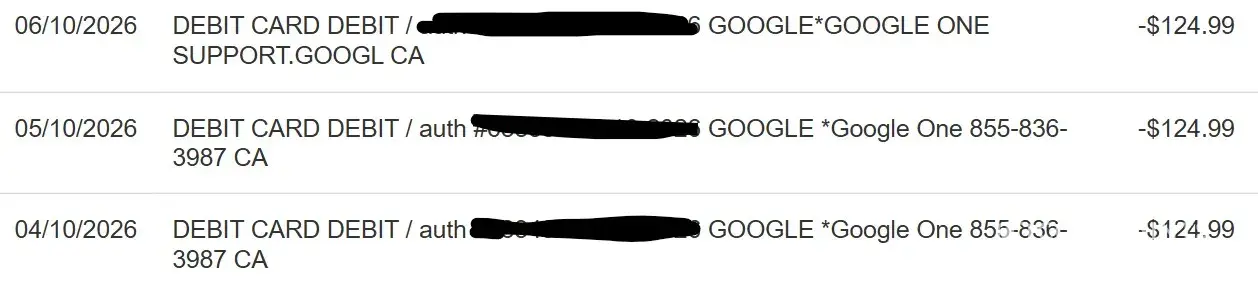
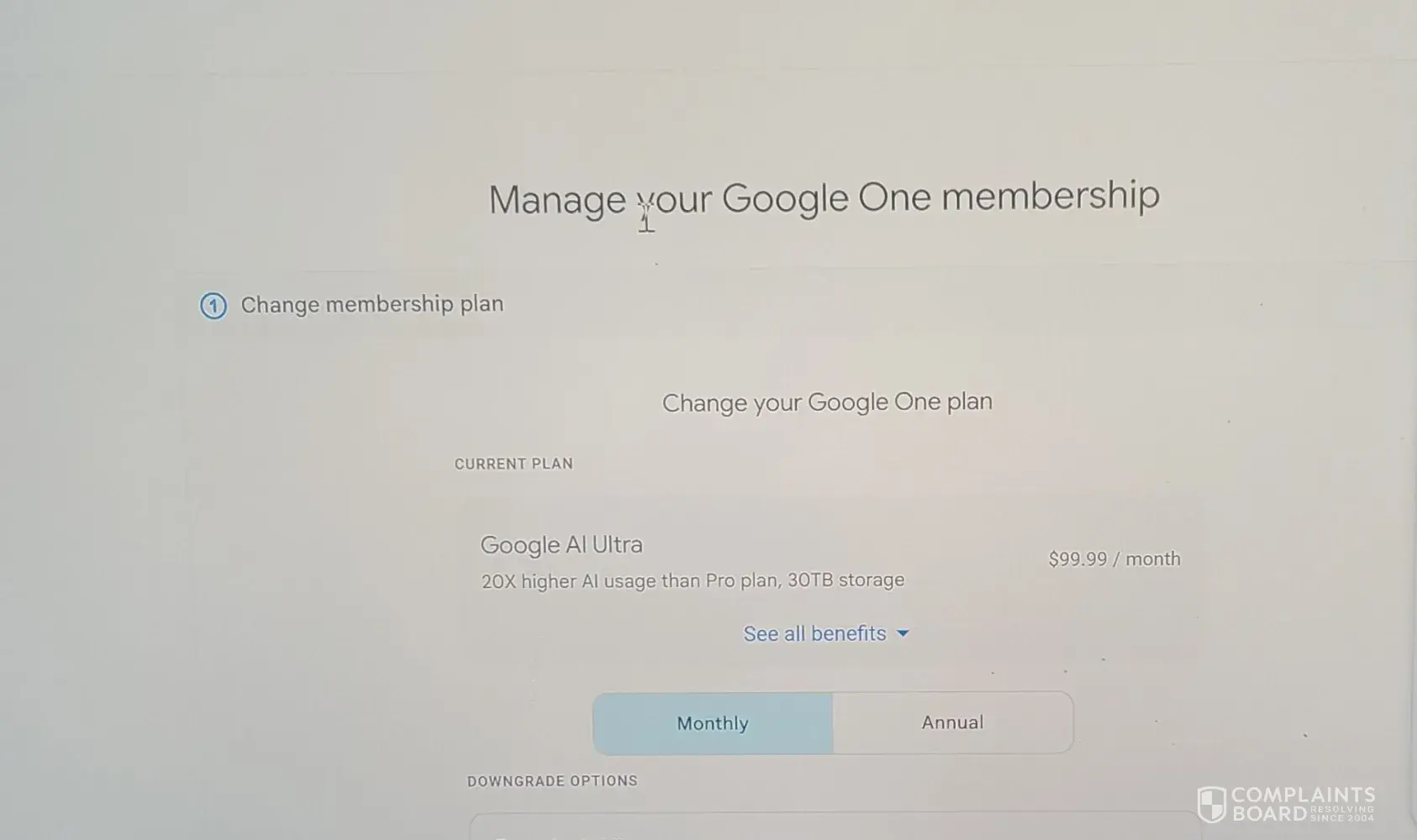
I have spent approximately one month and 10–12 hours of my own time attempting to resolve a straightforward billing overcharge with Google One. Across six representatives, I received repeated assurances, multiple case numbers, and four separate "wait 24 hours" responses but no correction. When my subscription lapsed, I was locked out of Google's support...


ID verification
Google will not allow me to use my email that I had for over 40 years since I could not remember my 40 year old password. They consistently used a business phone number that was taken out of service during COVID to try and contact me. Nothing I did helped. I tried for months to fix the problem with no results. After getting a new email, I cannot change or...
Read full complaintGoogle cloud
I’m filing this because Google billed me for API usage before the effective date they publicly announced, and they refuse to provide any evidence to justify the charges. On March 18, Google sent out a notice stating that Gemini API billing enforcement would begin on April 1. That was the only date given. There was no warning that continued use before April...
Read full complaintAccount recovery
Another individual replaced my email and phone number under manage account settings to theirs so now I cannot get into my email or my Google account that all my stuff is under now when I try to recover my account and get an email sent to an email I I’m still able to use my account recovery was denied because it said that I’m logged on, but I am not logged on. What you guys saw is someone else using my account.
Read full complaint and 1 commentGoogle won’t let me login to my google account
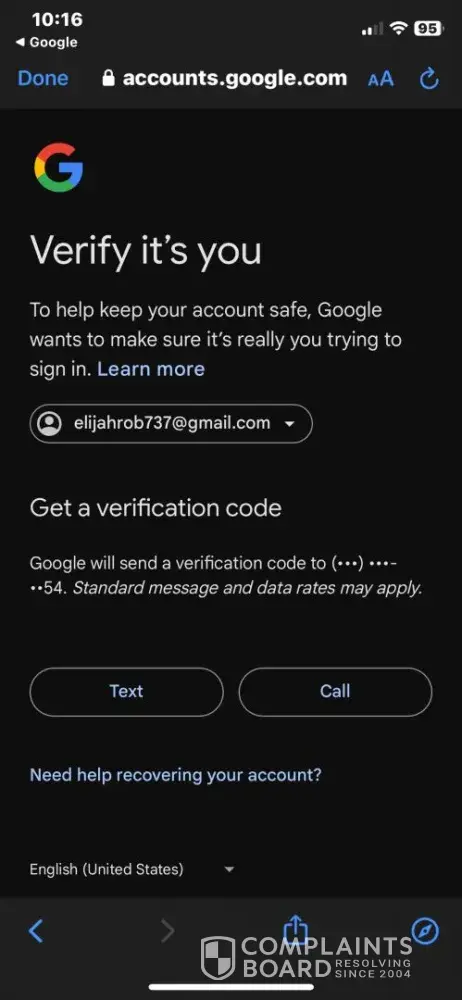
I’m trying to login to my [protected]@gmail.com Google Account, I still remember the Gmail and the password to the [protected]@gmail.com Google Account but unfortunately it keeps sending Verification Codes to my Old Phone Number Ending in 9154 that I no longer have and since I no longer have access to my Old Phone Number Ending in 9154 i can’t login to My [protected]@gmail.com Google Account (As Shown in the Picture) despite me typing in my Gmail Address and Password Correctly.
Desired outcome: I just want Google to let me Login to My [protected]@gmail.com Google Account Without Sending Verification Codes to My Old Phone Number Ending in 9154
Confidential Information Hidden: This section contains confidential information visible to verified Google representatives only. If you are affiliated with Google, please claim your business to access these details.
Chromebook problems
Hello! Here are a few other problems with the Chromebooks. The other review is about restarting secretly but here is more stuff that is not only 1 problem:
1. Bottom of the Chromebooks (under the keyboard) burning somebody: For some reason, whenever I use it, it gets hot and burns me (if placed on a lap) and nobody wants that. There's that one time that almost burned me (not a fire) and almost hurts my body that I have to go to the hospital if I get burned
2. Storage: I don't know why they provide the worst options but they should change it from min as 128 GB and the max option being 2 or 4 TB as I think it doesn't meet the requirements to be a "good" laptop currently
3. Slow charging speeds: At certain times, when I am using a real character that came with (real brand) that is 45 W as it says on the charger, it does not charge that fast sometimes despite with a few tabs open saying it takes a few hours when no settings were adjusted
4. Poor CPU performance: It does handle good but the only bad thing is that it does run slowly despite that there are other ones (that isn't slow but not a gaming version) that are better
5. Autocorrect correcting (it's a thing at the Settings app and the option "Enhanced spell check: To fix spelling errors, Chrome sends the text you type in the browser to Google") stuff into weird stuff that I never requested: At certain times, autocorrect would make weird stuff. For example, if I tried to type a word that I cannot type properly like "customize", it sometimes ignores it and forcing me to correct it by right clicking or it would just sometimes randomly place a misspelled thing like "custoomize" for example if I type like that or even being it uppercased like "CUSTOMIZE". Which should not do that as it should be improved. For example, if somebody was typing something and showing it to somebody (like a slideshow presentation) and one of these happens, it is embarrassing. Then people would make fun of the person who typed that which isn't funny
6. Not enough keys to be customized: In the keyboard section in the Settings app, there's a way to customize a keyboard. While there are things like changing the keyboard layout to a different language or something like Dvorak, and also features like changing the Ctrl key into something else. While it is useful, the lock button or the power button on the top right of the Chromebook keyboard cannot be changed
7. Camera app not saving settings: When I used the app somewhere around Feb 2025 or something like that, when I opened it, the front camera and the back camera were set in a weird resolution. The part I'm talking about is the "Photo aspect ratio". For some reason, when I switch the front camera to the back camera, the back camera isn't wide for some reason and the back camera is set to 4:3. However, I prefer 16:9 as it looks better for the back camera. When I checked the next day, it resets to 4:3 without any warning. Also, the front camera is at 16:9 when checked but when switching it to the back camera and looking at it again, it's set to 4:3 without a reason. Then it keeps adjusting it for no reason. Also, when switching from the front camera to the back camera, it takes a very long time (takes less than 15 seconds) which I think there's something wrong with the design that they are not supposed to do. Notes: Back camera(s) appear in some models by the way (which I wouldn't say is a problem)
7. Touchscreen glitches: In 2024, I started to notice that it's zooming in and out and I don't know why it happened. So I ignored it but it keeps distracting me. And I did know the model has a touchscreen, I tried cleaning it, and it worked. However, after a few days, the glitch comes back and it's annoying. Also, I saw other people having the same issue. So that means the touchscreen is not made correctly despite cleaning it
8. Needs to be liquid-proof: When I was drinking milk one time in early 2024, I spilled it and then, some keys doesn't even work and for some reason, when I press the H key, it presses the W key also because of not being liquid-proof (or waterproof)
9. Losing all local data when I forget my account password: For some reason, on Feb 2025, when my device crashed (due to a another reason but more info can be found in a another complaint about the same company), I typed the password the wrong way and I didn't know that. I did sign out and press that I forgot my password but it tries to delete my local data if I continue which I do not want because there are important websites that I normally use everyday (like Gmail) and they could've just allowed us to enter the new password instead and save the data and if there is a hacking attempt by changing the password, a user can go to https://myaccount.google.com/security and fix it or see what device it was. So that's not a hard thing to add
These are all the reasons why I don't like my Chromebook. If these issues aren't fixed (between these years) by 2026-2030, then I will sue them for not fixing these issues here. If I need to add something to the list, I will mention it in the comments of this complaint. If one of the issues up here is resolved by a update, then I'll say the issue is resolved for whatever number is listed
Confidential Information Hidden: This section contains confidential information visible to verified Google representatives only. If you are affiliated with Google, please claim your business to access these details.
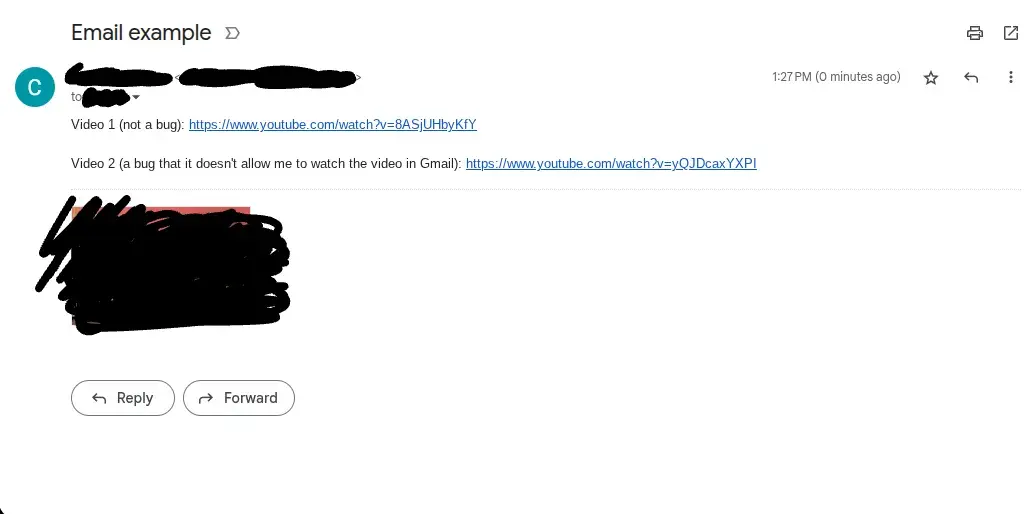
Ok. Sorry about the link thing (for #18). In the picture, it says it was a video about Fruit Ninja glitches (I found that from Microsoft Copilot when we are discussing about Fruit Ninja glitches) (video 2) but I didn’t know that the video doesn’t exist. So sorry about that if I mistakenly placed it there but I don’t know what the AI was trying to read the title name for. I tried other videos (that is existed and double checked) and some do not appear
I want to add #18 to the list: There's a problem (possibly a bug) that certain videos would not appear in Gmail (YouTube links), even when the video is real. In the screenshot below, I placed 1 video mentioning it's not a bug (the video link is Fruit Ninja related) and the 2nd video link I provided is a video of Fruit Ninja glitches but for some reason, it did not appear in the video section in Gmail and it only appeared 1 video (even though, there are 2 videos). No, it's not edited as if you try this yourself, you will encounter the same issue. I don't know what triggered this because normally, all YouTube links should display all existing YouTube videos in Gmail on any links related to that but it only displayed one. If I place a different one that doesn't cause the glitch, it can appear as more than 1. Here's the screenshot below (again, it's not edited (except for contacts and my email which is hidden) and there are YouTube links in there that I provided as a sample)
Sorry, for issue number #17, when I meant by 1 or 2 minutes, I meant wait. Sorry if I made some mistakes
I forgot to mention of the URL link of the secret restarts complaint. It's about restarting the Chromebook whenever I never touched it (when it's not used). You can look at it here: https://www.complaintsboard.com/google-b115683#c1991489
And you'll see how many times Google just did to me since I filed a complaint about that. I don't know if this will get merged into here so if it does, I'll let you know about that
I want to add #17 to the list: Opening a video in Gmail after it's sent makes the video close shortly after: So when I send a email to somebody and I wanted to watch the video after I just sent it and click on the video (watching a video in Gmail), it just closes it even if I didn't press anything without a reason or warning. When I press the same video again and didn't do anything, it just does the same thing. This only happens after it's sent and if you want 1 minute or 2 minutes after it's sent and try it again, the bug stops. I first discovered this bug in spring 2025 or something like that and it's still unresolved as of [current date]
I forgot to mention some things on the account disabled thing (#12): So after my account got disabled (again, it's Jan 29, 2025), I got in trouble for not doing the work even though, my work is one of the Google services and I couldn't access it and blamed me for not doing my work (even with proof that it's showing a blank pop-up banner) when I didn't notice my account was disabled (it was a blank pop-up banner as I mentioned before. It's not a virus or a mod as I wouldn't do that). I didn't do anything bad on any Google services, no bad emails, and nothing wrong. Then they just let me just do whatever I wanted but I tried non-Google services and it worked like Wikipedia. So for the rest of time until noon, I just did whatever that doesn't make me bored without using Google services
I want to add something to the overheating issue (#1): When I checked with my AI bot on what's the good limit it should be (on how hot it should be), it should be 122 F (50 C) or less as the temperature. However, it often goes beyond 50 C and if you have a Chromebook and if you wanted to know how hot it is, there's a way. It's not a secret but if type in chrome://diagnostics in the browser and hit enter (this won't work on devices that is not a Chromebook), it will open the app and you'll see a section of the CPU but sometimes, I seen it hit 85 C (185 F) or higher which is a safety hazard. This is why Google and/or other brands need to double check on how safe it is and test. This feels like this company did test some but never the overheating issues as there's a another time that I got burned so hot from that and it almost made me go to the hospital because of how hot it is
I want to add #16 to this list: The next problem I'm starting to encounter is that when the website loads and do nothing or sometimes, I scroll, it causes the device to lag (most likely 1 FPS or less on the device itself) from 1 second to a few seconds which this is a extremely rare case before Aug 2025 (which only happened once as far as I remembered) but after Aug 2025 (when I updated the device itself), it's starting to appear more often. I don't know how this happened as the tabs I placed are often not powerful
I wanted to add on into #4 (and other ones): So after I updated my device into the new version, none of the issues have been resolved (after I updated it, it looks better but the CPU performance slowed down a little bit after that). The issue with auto correction is still not fixed even with minor improvements. Still, when I type "Geometry", I sometimes misspell it as "GGeometry" and still has not address the issue and it feels like a auto corrector that sometimes acts like smart and sometimes dumb at the same time. No issues have been resolved. The overheating issue has still not been resolved because at a another time, it got a little hotter than before after the update.
Also, I noticed that the tagline "The better way to laptop." doesn't always represent the tagline itself because of some issues that I mentioned above. Booting up in seconds, automatic updates, smooth performance, and other ones is true but smooth performance doesn't always belong there when it lags (even with 5 tabs opened or something like that)
I don't want to take up more space so I'll stop explaining it here unless I need to say more issues or any updates that I wanted to say. If all issues I mentioned were resolved, then this complaint will be resolved
Ok. Turns out that problem #3 appears to be a faulty USB-C port. So when I updated my device to the latest version, I did go to my friend's house and test the port on the right side of the Chromebook and it still charges slow. Then I tested the left side and it appears to be charging normally. Turns out, I discovered that the USB-C port on the right side of my Chromebook appears to be faulty (these results can be different for people so they won't encounter the same issue). However, for both sides, it's supposed to be fast, not slow. So this means that the manufacturer made a mistake or secretly used a faulty USB-C port in one of them (this is not always true and can change and I will let you know if there is anything about that happening)
I want to add #15 in the list:
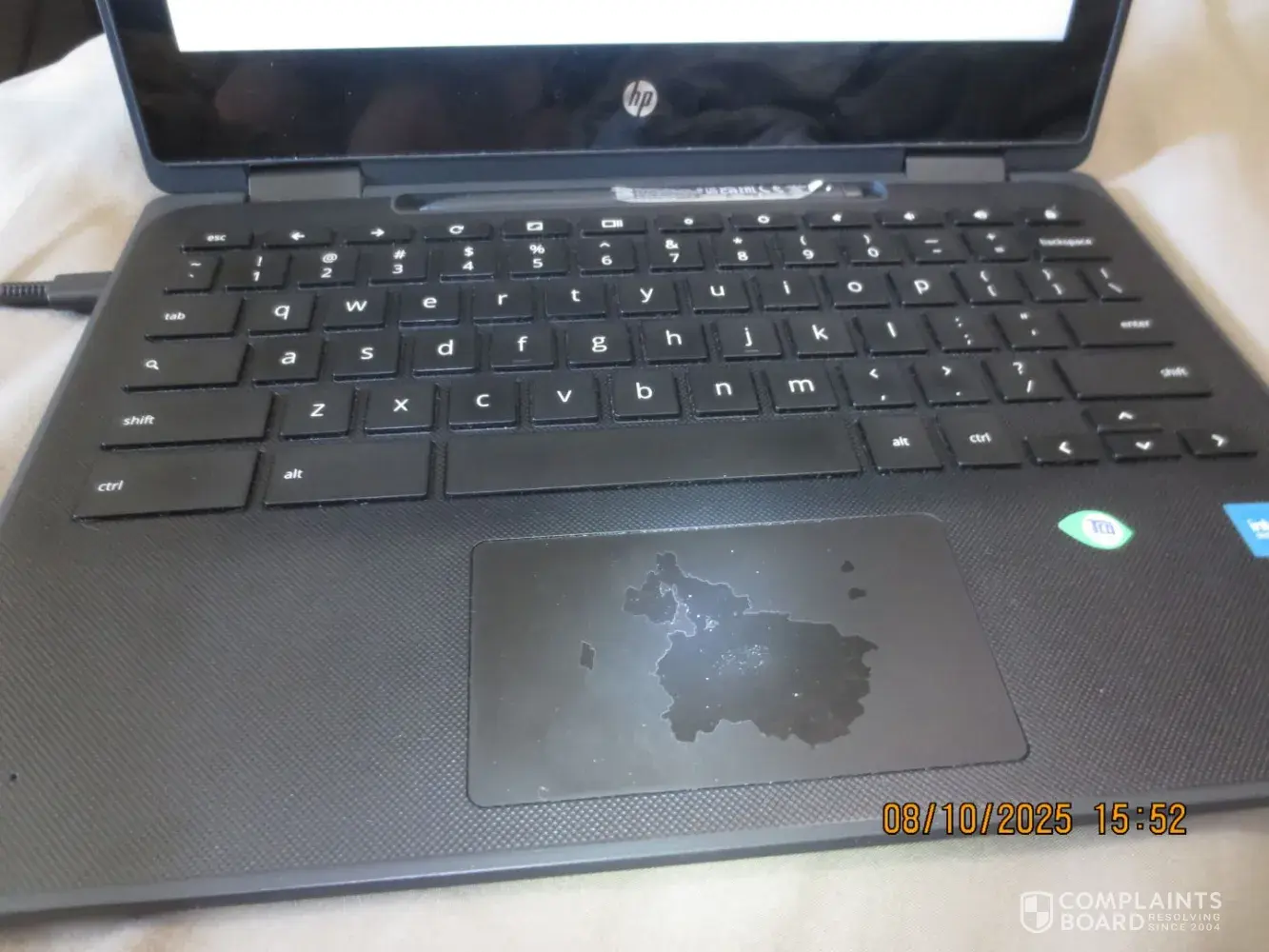
15. Trackpad being torn down: So somewhere before June 2025 (likely May 2025), I started to notice the trackpad is a bit off. And when I tried to clean it, it doesn't work. So I ignored it but it keeps expanding by wear and tear and I don't know why it does this. I did not do any damage to this but for some reason, the trackpad still works but the layer is torn down (and nobody wants that) and other laptops (that are not Chromebooks) does not have this problem. If you look at the picture, this is what it looks like (this looks like the UK and other lands connecting to Europe and it also looks like a face) (this is as of Aug 2025)
Ok, sorry about that. For some reason, the email complaint I just did a few days ago is moved in here for some reason. So that would be #14 in the list. Here is what it would be:
14. Emails turning purple or leaving it blank: In addition to the email thing above, this causes colorblind issues. While I'm not colorblind, colorblind people could possibly have one of these issues right here (all of these things if the text is purple for a normal person):
- Red-green deficiency colors: Blue or gray
- Blue-yellow deficiency colors: Possibly blue or gray (?)
- Total color blindness: Seeing all gray (grayscale)
Also, making the text in purple can be harder to read. So for a normal person, purple text has low contrast, visual fatigue, and vibrating color effect. It would cause eye strain (or make the text appear faint but can be harsh on the eyes), a visual vibration (for vibrating color effect) on the text, and few other things. I'm not a professional about these things so I could be wrong
I'm going to add #13 on the list:
13. Scrolling would not work in Google Chrome: At little rare cases, the scrolling would not work. When I try to scroll with my mouse, it would not work on whatever tab I did. If I choose a different tab that does have scrolling, it works normally. For the page that the scrolling wasn't working, I tried the touchscreen also but it doesn't work either. I tried refreshing the page but it doesn't work also
I also provided a weird thing about Gmail email(s) turning purple or blank on some stuff which is mentioned in a another complaint, not in here
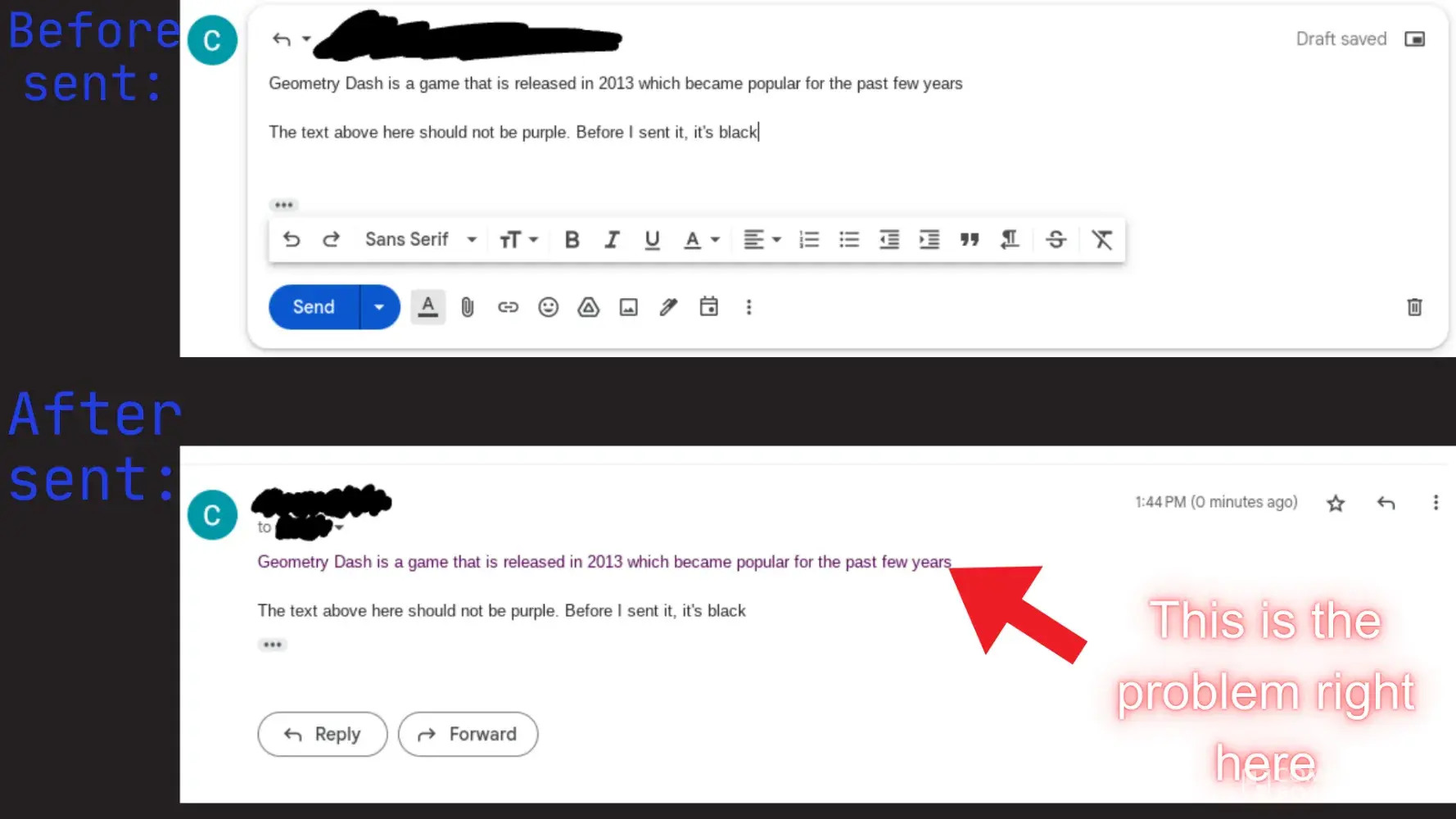
So when I was sending emails about the same thing when talking to somebody, I copied the thing and pasted it and the text was not purple. When I sent it, the text I just pasted was purple. I did not use any mods for this and the text was set to black. And I tried different ways such as Ctrl + Shift + V (which pastes the text without formatting it) which it does work in documents but not on emails when sent. When I did that, and again, it turns the pasted thing that I said before into purple. But if I add a comma between the sentence (it was a test), it did not turn purple. The thing that disappears is something weird. So when I paste a template and use the same template it again and paste the same text in the same template, it disappears. There's that one time that I warned them to stop using a template saying a warning to stop and they didn't stop and continued. So I used the same template saying the same message (nothing edited) and the message disappeared. But then, I got blamed for sending a blank message when I checked and it was gone. I double checked and it just edited my email without consent. I tried it again, double checked, then sent and it's gone. So this means that there's somebody hacking the email system (this is not just me, I seen other people having this issue in real life on where I work and I think everybody had this issue) or this is either a bug. The picture (it's edited showing before send and after sent the message and I used Canva to make this picture) I provided is a example on what I just said with before and after (when saying the same thing twice) showing the text being purple after the email being sent (not the entire email but the part I just said (this is a 2nd response))
I want to add on to the charging problems (provided more details for #3). At certain times, it would charge normally and takes 1 hour to charge it full (yes, that's normal) but for some reason, when I did it at 3 PM (was at 50 something %) at Jul 31, 2025 and waited until 6:20 PM (takes around 3 hours) when I did that at my friends house, it only took 40% of the battery to be charged. This happens at my friends house. When I tried it at my home, it charged fast. When I tried it in my friends house, it charged slowly. So this could be a outlet problem. When I asked my friend to check if the electrical outlet was working fine (and the voltage), my friend said yes, it was working fine and the voltage is normal. I double checked if it was fully plugged in and it was plugged in fully. But I heard that opening a lot of stuff or background apps slows down the charging. However, no background apps/syncing were opened and I don't have them on. So when I tested 1 tab (that is Wikipedia) at home, it normally charges. When I tested at my friends house (a few days before Jul 31, 2025), it charges slow with the same article. When I tried to charge it at home it still works but charges faster despite the fact that I am using the same charger. We tried a different plug outlet and it still charges slow and the same way. The cable quality is good. One Wikipedia small article tab does not affect charging speed and I don't know what was happening then. When I checked if it's a plug outlet extender sharing high watt power to other devices, it's not and I tried a normal wall outlet and the issue remains the same. The next thing it could be the cause is the extensions that I have installed or turned on. I tried uninstalling them or turning them off but they still charge slowly in my friend's house. This is illogical and unusual. So the cause is unknown or possibly wanted me to waste more time charging instead at certain places
Here's 1 more thing I would add:
12. Keys would sometimes think I pressed the same key twice: For the past few months, when I type sentences (sometimes), it would think I press a key twice making it weird. For some reason, it feels like (it's a similar problem with a another company) a Apple Butterfly Keyboard problem (in the past) despite that I only pressed it once. This isn't my skill issue because I pressed the right key and there was something wrong. Here's a example of what I was supposed to type and showing what happens after I typed the whole thing with the first letter appearing 2 times (this happened to me at Jul 2025 when I was trying to type something important):
What I was about to type (this is a example by the way): You're supposed to know these facts about Geometry Dash just in case
What the result went: You're supposed to know these facts about GGeometry Dash just in case
The term "GGeometry" is not supposed to be like that. I tried it on a typing website also and the same problem happens. It's not a autocorrect thing that does weird stuff but the keys are pressing the same thing twice (sometimes but not that often)
I want to add 2 things:
10. Trackpad showing fingerprints: So every few days to 2 weeks, when I use it (I use it everyday), it keeps getting dirty for no reason. Also, I have to clean it a lot which is annoying. While I can use a cover, it's a waste of time because other brands (not Chromebook(s)) doesn't have this problem
11. Screen capture keeps adjusting settings: The screen capture I'm talking about is click on the current time icon that is pre-built (it depends on where you set it but I prefer it to be bottom right as other styles (like left or right) feels weird although this is not what I'm talking about), click on "Screen capture", select video (right next to the camera icon), and go to settings. Then "Audio input" keeps setting it into off for no reason. This started a few weeks ago when I was trying to share a recording with somebody and when I uploaded the file, they said there's no audio and they made me mad and when I checked the settings of the video recorder, audio input was off and I switched it to "Device audio". However, when I restart the device or whenever it crashes (the crash thing is a problem but it can be found in a another complaint about the same company), it resets the option to "Off" for no reason and I didn't get a warning on why it was set like that
12. Disabled my account for no reason (lasted a few hours long): So on the day of Lunar New Year of 2025 (Jan 29, 2025) (I know the date on what happened because it happened on Lunar New Year day and it's easy to remember for me), at 8 AM, when I was about to do my work, I got a blank pop-up message saying nothing. There was a option named "Cancel" (correct me if I am wrong) on the bottom right of the pop-up message which I did and tried it again but the same thing appears. So when I tried Gmail or any other Google service (like Google Translate), I get the same thing and I asked somebody who can help showing what happened in front of them but they said they cannot do anything about it as they don't control it and said they have never seen that before. I thought it was malware that somebody might've installed but no. When I tried websites like Wikipedia, Scratch, and games (which I have permission for) the pop-up didn't appear. So I used Wikipedia and games because that's my only thing I can do while waiting. So that means that I cannot access Google services. At 10 AM, when I thought the issue was only 1 hour, it was not. I asked the other person (not the same person) again and said try restarting the computer. So when I did that and logged in, this time, it says my account is disabled for no reason and didn't mention how long. I have not done anything bad before that and I couldn't do my work. And I became bored that I just drew a random Classic mode gameplay of Fruit Ninja on paper and there's nothing I could do. Then by 11 AM or 12 PM, my account got undisabled (or unblocked) but I didn't get a warning on why my account was banned and after my account was not disabled anymore, I can finally do my normal work and no longer be bored.
Google won’t fix my student trial issue – stuck with no solution
I’ve been trying for over a week to activate the 15-month free student trial of Google One + Gemini using my verified school email, and it’s been a nightmare. The student email was originally linked to my main Google account, but the trial never worked properly. After multiple failed attempts and support emails, I created a new account hoping to finally...
Read full complaintChromebook keeps turning off, even when the software is updated
Hello! My Chromebook keeps turning off sometimes when closing the lid of the Chromebook (mostly every 2 weeks I believe) even though, the operating system is updated and "Sleep when lid is closed" option is on. I don't know if the manufacturing is incorrect because it keeps doing that for the past few months. Also, in rare cases (a different issue), after I plugged the charger (a normal charger that came in the package when I got this) in the device, it would just restart the device itself even though, again, the option "Sleep when lid is closed" is on and the software was updated
Confidential Information Hidden: This section contains confidential information visible to verified Google representatives only. If you are affiliated with Google, please claim your business to access these details.
Sorry if I didn’t post any updates. I don’t want to continue spamming this anymore and I am busy
Google, I said stop doing this to me and it's annoying! Stop doing that at 10 PM (PST) when I'm doing something. Google, if you continue, you will get in trouble. Nobody touched it and it's real
I am so mad now that I punched my device in the screen (not that hard) at 12:10 PM. At 10:40 AM, I went somewhere and closed my Chromebook for a reason and nobody touched it and when I came back at 12:10 PM, I said a bad word (I can't say what it is here) and punched the screen a little hard (though I didn't break it). It says the device crashed (when I logged it back in) and I know, again, it's false. Somebody was trying to hack my device when I was away. I placed it in a room that nobody would see and it still happens. So the possible answer is somebody from Google is hacking my account and signing out on this device. However, when I checked at https://myaccount.google.com/security, it doesn't mention somebody logged into my account. So a another possible answer is hacking without logging into my account. I only have 1 tab and I am getting mad about this and going to break this soon
There's that one time in 2024 that when I was about to start a presentation, my computer just shuts off when I plugged the charger in when I have low battery but for some reason, it just restarted and people are laughing about my Chromebook crashed when I plugged it in which it is not funny
And again, I will be recording on times when crashing happens in here
If you are reading this Google, this is serious. Do not do pranks to any people with Chromebooks and stop doing that to people
And this is my place to record on the time it happened here (I forgot to mention this but I started doing that in May 2025)
That is what I said on Jul 21, 2025 morning. On Jul 20, 2025, I need to go to bed because it's nighttime and when I wake up in the morning, it restarts for no reason and I will buy something else instead soon
Should you buy Chromebooks (for schools): While it is good for school, I've seen students getting the same thing as me. So the answer is, no. Also, there are other issues that are not about this
"I hate this ####! I will destroy this and buy something else!"
What in the hell!? It keeps doing it for no reason and I'm getting more mad already! On Jul 16, 2025, afternoon, I went outside for a few hours and does the same thing. I'm already getting mad about this and I will sue Google (and/or other companies that makes this). If this continues, I will quit using the device and switch to something else. Nothing changed
If they don't resolve the issue, then I'm going to sue the company earlier than before. This morning on June 25, 2025, when I turned it on, I thought there was something wrong but it says "ChromeOS" on the startup which means it's booting. It also appears when I restart the device. Yesterday, I did not do that and I needed to sleep. So I turned it off (without pressing the power button) and this morning, it just restarted for no reason and just wasted my time. That's why I filed a complaint here and will sue Google in 2026 or 2027
And this morning (June 19, 2025), it just did the same thing again for no reason. Last night (June 18, 2025), I have to go to sleep and I closed it with only 1 tab open and when I opened it in the morning, somebody just secretly restarted my thing for no reason and it says my device crashed which I know, again, that is false as devices like iPhones never done this. So that means somebody from Google or whoever the company is doing that is secretly signing out my account or restarting my device every few weeks. If this continues, I'll file a lawsuit against that in 2027 (not sure which part of 2027) for secretly doing that
And when I logged back in, it says my device crashed. And I know it's false as I only have 1 tab
Ok, when I was finishing something at June 4, 2025 somewhere near 1:30 PM (PST), I closed it and nobody touched it. It was not touching anything dangerous. Then when I come home at 3 PM and opened it, who in the world just signed out of my thing? And I will possibly file a lawsuit if this never gets resolved by 2027 (not sure if I will do that). And "Sleep when lid is closed" option is always on and again, I never turned it off
I forgot to mention that after I log back in the signed out part, the notification says my Chromebook crashed unexpectedly which I know that is false because the software is updated and again, the option named "Sleep when lid is closed" is on the whole time as I don't turn it off this option. So that means that Google (or whatever companies that makes this as it's not just 1 company) could be hiding something that does that every 2 weeks
I want to add something to the 1st one:
It would just sign me out without any warning after I closed the lid of the Chromebook. After I closed the lid, I was on my phone watching something because I was bored but nobody plugged something in the device (Chromebook). Nobody opened the laptop because I was right next to the laptop the whole time and when I opened it, it randomly signed out and this issue has started in late 2023/early 2024 and this happened to me somewhere near 8:30 PM (PST), May 18, 2025
Google is a vendictive monopoly company that acts like a dictatorship
Google is restricting my ability to use my account for no reason. They all of the sudden not allowing me to renew my google drive and declining to process my payment. They are now telling me I will lose my saved material on the google drive which is mostly personal items.
I have not violated any policies or done anything. Google is not responsive. They asked me to upload my ID which I did but they are still refusing to allow my account to renew subscriptions. I spend thousands of dollars of the years on my google drive and application. I am asking to restore my account and compensate me for the damages caused by google.
This is causing me stress and problems. I plan to file a complaint with the FCC and the CA attorney General.
Claimed loss: thousands
Desired outcome: restore account before we file a lawsuit.
Posting jail mugshots
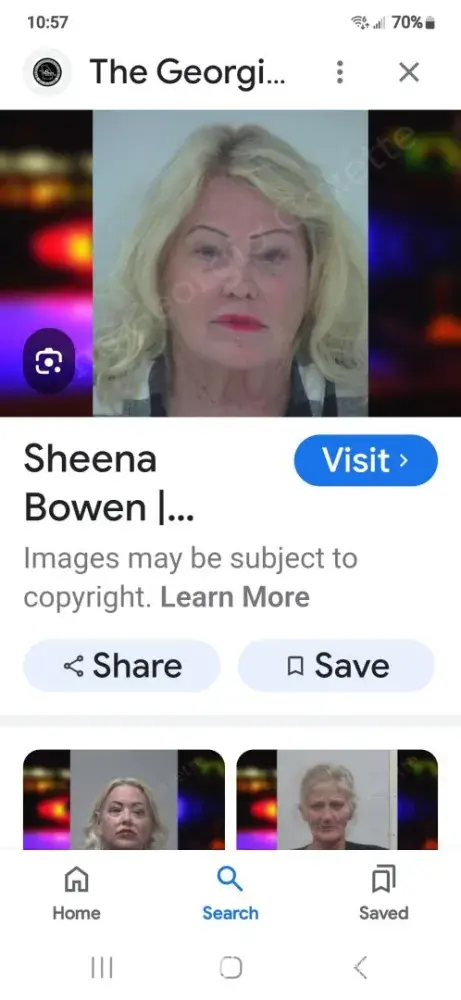
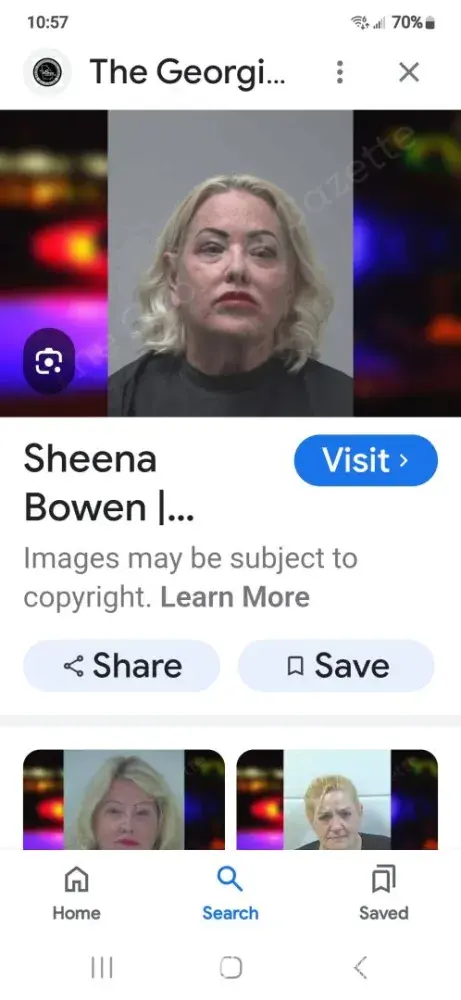
The Georgia Gazetta is allowed to post mugshots. Yes this is public record knowledge but it's in the wrong hands. These people running this business have destroyed people's careers along with their [censored] attitudes. Read BBB reviews..these ppl are heartless and don't care how they talk to you. Matt is a complete idiot that accusing you and makes you guilty of a crime before you have gone to court. These people need to be put out of business
Desired outcome: To have my mugshots removed from Google search when I search my name..first thing comes up is a coweta jail booking..also fayette county mugshot..its being posted by Georgia Gazette
Confidential Information Hidden: This section contains confidential information visible to verified Google representatives only. If you are affiliated with Google, please claim your business to access these details.
Internet services
This Complaint is against the Google LLC. I am a Google Play Console Developer. They have removed my account and Apps from Play Store, because they are using the AI bots everywhere. I contacted Play Console support many times, but they did not guide me properly. I submitted my Legal documents for identity verifcation many times, on one side they send me verification mails, and on other side they do not accept them, and rejected by saying that my name is not matching on my submitted documents and on my account. Fact in that my name is same on documents and my account (you can see the screenshot). I was confused that what is going with such a giant and advanced company Google that they are making illoigoical claims. Fortunately they accepted my passport instead of my Government issued ID card for name verification. But the question is that what about those who do not have passport, because everyone have ID card but not passport. anyways, after that they claimed that my name is not same... (worth $5000) to help people freely related to their education. I submit an appeal, but again bots rejected my appeal by saying that they can not help me, they did not address my issue properly. I contact support team but the response is same, like everything is automated and no human is in google offices to help other humans. Fact is that any mentally fit and literate person can see that my submitted documents are legal and showing my identity clearly. If they are not accepting these documents than I do not think that there is any other way to verify developers besides visiting their hosues physically. I am trying my best to recover my profile and apps, but my heart is broken into pieces, because console's false policies runied my dream of educate the society. I will raise my voice against them at every platform. Because We want Justice, Justice and Justice... I am ready to submit my documetns to prove my claim. My Developer ID [protected] Support Ticket ID: [protected]
Confidential Information Hidden: This section contains confidential information visible to verified Google representatives only. If you are affiliated with Google, please claim your business to access these details.

Google account
### Evidence of Abuse Risk Limits in Google's Systems
According to data from the Google Account Help Community, nearly 100 million Google users currently seek assistance for account recovery daily. Most users' posts are deleted, and none of them successfully recover their accounts. This situation highlights significant abuse risk limits within Google's systems.
#### Additional Evidence of Abuse Risk Limits
On June 7, 2024, I received a notification from Google stating that if I couldn't verify my identity, I would not be able to complete sensitive actions for 7 days, after which I could access them without verification. After waiting 7 days, I attempted to log in but received a different message:
"We noticed unusual activity in your Google Account. To keep your account safe, you were signed out. To continue, you’ll need to verify it’s you."
This contradictory experience highlights several critical issues:
1. **Inconsistent Verification Processes:** Google's system initially promises access after a 7-day waiting period without verification but continues to demand verification due to supposed unusual activity, indicating a lack of clarity or adherence to stated policies.
2. **Potential Delay in Account Access:** Users may experience extended periods without access due to conflicting messages regarding verification requirements, potentially impacting their ability to use essential services.
3. **Trust and Transparency Concerns:** The contradictory messages erode user trust in Google's security protocols, highlighting a need for clearer communication and adherence to stated security policies.
#### Reasons why the account cannot be verified
1. When attempting to log in, the system prompts:
"You didn’t provide enough info for Google to be sure this account is really yours. Google asks for this info to keep your account secure. If possible, when signing in:
- Use a device where you’ve signed in before
- Use a familiar Wi-Fi network, such as at home or work."
I confirm that I am currently using devices, Wi-Fi networks, and browsers that I have used to log in to this account previously, but the system fails to recognize them.
2. The recovery email address associated with this account is currently unable to receive emails from Google systems.
3. I have attempted to seek assistance on the Google Account Help Community ([https://support.google.com/accounts/community?hl=en](https://support.google.com/accounts/community?hl=en)), but the community does not provide effective help and only deletes posts.
### Legal and Ethical Arguments Against Google's Abuse of Risk Restrictions
#### Legal Basis
1. **Antitrust and Competition Laws:**
- **Dominant Market Position:** Google holds a dominant position in the search engine and online advertising markets. Its vast user base, estimated at over 3 billion users of free services, contributes significantly to its advertising revenue. Antitrust laws prohibit monopolistic practices that harm consumers, including unfair treatment of users.
- **Equal Consumer Rights:** Given their substantial contribution to Google's advertising revenue, the 3 billion free users should enjoy the same consumer rights as paying customers. Denying them equal treatment in account recovery and security measures can be construed as an abuse of Google's dominant market position, violating principles of fair competition and consumer protection.
2. **Data Protection and Privacy Laws:**
- **General Data Protection Regulation (GDPR):** Google operates in jurisdictions covered by GDPR, which mandates transparent and fair processing of personal data. Inconsistent account verification processes may violate GDPR principles, especially concerning data security and user rights to access and control their personal information.
#### Ethical Basis
1. **Critical Contribution of Free Users to Revenue:**
- Google's advertising revenue heavily relies on its vast user base, particularly the 3 billion users of free services. These users generate substantial ad revenue for Google. Treating all users fairly and providing robust security measures is essential because their collective usage directly contributes to Google's financial success.
2. **Fair Treatment:**
- Ethically, Google should uphold principles of fairness and transparency. All users, regardless of whether they pay for services, deserve clear communication and consistent account recovery procedures.
### Conclusion
The evidence of abuse risk limits within Google's systems, supported by compelling legal and ethical arguments, underscores the urgent need for Google to address these issues promptly. By implementing consistent verification processes, enhancing transparency, and respecting user rights, Google can mitigate legal risks, uphold ethical standards, and maintain the trust of its extensive user base.
Desired outcome: Recover Google Account
Confidential Information Hidden: This section contains confidential information visible to verified Google representatives only. If you are affiliated with Google, please claim your business to access these details.
Charges for google storage
We have never signed up for Google storage, but I have been billed monthly and have not been able to speak to anyone there about it. Initially, it was a small amount for a 5GB account; this month, it was for $21.71, with no explanation. Google conveniently does not have a customer service phone number or email address (at least, I have not been able to find one).
Claimed loss: monthly charges
Desired outcome: cancel subscription and refund
Confidential Information Hidden: This section contains confidential information visible to verified Google representatives only. If you are affiliated with Google, please claim your business to access these details.
Taking money off my card. Without my permission
I talk with a lady on 4/1/24 that works for direct express and she told me there was nine transaction on my account from google and google took money off my card on 3/1/24 and 4/1/24 and she turn me over to dispute department and i was on the phone from 10am till 11:20am and recording says.Your dispute has been done.Goodbye and at present my dispute has not be taken care of yet and i need my money and i did not get mail or email,phone call and i talked with google and they said everything was free and i told them.Why did direct express tell me that google took money and they hanged up on me.I need my money put back on my new card and the money was taken off this card [protected]/08/31/28/972 and i need my money.I am on a fixed income.
Claimed loss: money taken 39.99 and 39.99
Desired outcome: please refund.
Confidential Information Hidden: This section contains confidential information visible to verified Google representatives only. If you are affiliated with Google, please claim your business to access these details.
like
Google content removal, search engine removal support
This review is for the very bad, mean-spirited and incompetent people that work at Google, I am glad a portion of the employees were laid off as it seems they only hire based on your race and not what you can actually do. If you find yourself on the receiving end of harassment, revenge porn and having all of your personal data leaked on their search engine they will fail to remove despite multiple attempts, they do not care, it is no wonder people commit suicide from all of the stress they cause you. You will only receive standard automated responses with the same thing over and over again, nobody listens to what you are trying to say despite providing ample documentation and reasoning that you will be pushed and start responding in anger after 50 attempts. They are biased and keep stuff up from your stalker, doxxer. Google is a woke cesspool, all of their products are terrible including their Ads account too, you will be subjected to poor support and have your service shut off for no reason as well. If you have a Youtube channel they will deliberately erase all of your hours earned so you can't make money.
Confidential Information Hidden: This section contains confidential information visible to verified Google representatives only. If you are affiliated with Google, please claim your business to access these details.
This is why you can't trust doctors' reviews on Google
I wish I could give Google '0' star!
If you search online (Bing, DuckDuckGo, google, etc.) for "Issaquah Foot and Ankle Specialists" or "podiatrists in Seattle," "bestfootdoc.com" (Photo 2) will likely come up on top of the search. Click on it opens an ad for "Issaquah Foot and Ankle Specialists" with a Google review thumbnail (Photo 1) on the lower left, currently showing a rating of 4.9/5.0,131 reviews as of 09/05/2021, and another one for request appoint on the lower right.
Problem is, most of those 5-star reviews are fake!
In June 2014, I went to Dr. Brandon Nelson at Issaquah Foot and Ankle Specialist for a small bump that was caused by rubbing with a stiff shoe. Dr. Nelson misdiagnosed it as bunion, did a bunion surgery that was not even required, and botched it. The surgery left my left leg permanently impaired.
I went to Dr. Brandon Nelson because of his glowing reviews on Google, Yelp, and other social media platforms. After the botched surgery, I realized most of those reviews were fake. Dr. Nelson had negative reviews on Yelp, but they were moved to 'not recommended category,' which I didn't even see at that time. Had I seen those negative reviews or realized that so many of his 5-star reviews were fake, I would not have gone to him, and I would still have a normal healthy left foot today. I feel I was duped into using this doctor.
After the botched surgery, I posted a one-star review for Dr. Nelson on Google in Nov. 2017 and updated it in Jan. 2020 after a trip to another country in September 2019 for medical treatments. A couple of weeks later, Google removed both my original and update reviews (Photos 3 &4). However, Google kept Dr. Nelson's fake 5-star reviews up.
Google 'Issaquah Foot and Ankle Specialists' or follow the link below and click on the earlier reviewers' names with more than one reviews to see their other reviews. Most of them also reviewed one or more of the following businesses: Seattle Mobile Detailing, Prime Mobile Detailing, Mold Removal Today, Chipotle Mexican Grill, Social Cow Marketing, First Response Restoration, Subway, etc. Coincidence? I don't think so. They are fake reviews. This doctor had this flaw fixed on his recent reviews. However, most of his recent reviews are still fake reviews.
https://www.google.com/search?client=safari&source=hp&ei=CybYX_7yBsvL-gTNjaXYDQ&q=issaquah+foot+and+ankle+specialists&gs_ssp=eJwNw0EOQDAQAMC48okm3G2lWvUEv1hbpVFKthLPZ5Ipq3ZtZT46S_cBxdjA2ysL2lsyXroZtR_hVVqSlQZoMG4eYKoDM94PbsKnlAWe7r_HRfC1UMAYOPMHfdUcAg&oq=Issaquah+Foot+and+Ankle+Specialists&gs_lcp=CgZwc3ktYWIQARgAMg4ILhDHARCvARDJAxCTAjIGCAAQFhAeMgYIABAWEB4yAggmMgIIJjoICAAQsQMQgwE6CwguELEDEMcBEKMCOgUIABCxAzoCCAA6CwgAELEDEIMBEMkDOggILhCxAxCDAToFCC4QsQM6AgguOgsILhCxAxDJAxCTAjoLCC4QsQMQxwEQrwE6CAguEMcBEK8BOgsILhDHARCvARCTAkoFCAQSATFQiiJYwLUBYJrGAWgAcAB4AIABc4gBzROSAQQzMy4ymAEAoAEBqgEHZ3dzLXdpeg&sclient=psy-ab#lrd=0x54906f9c7f1dba6f:0x461c9170c87db80,1,,,
Google knew most of Dr. Nelson's reviews were fake, and Google chose to profits from his fake reviews. Google is unethical!
Google, state regulators, colleagues and staff of Dr. Nelson, and people who posted the fake reviews for a few dollars all failed their social responsibilities. They are all at the same level, and they don't care!
In addition to fake reviews posted by others, Dr. Brandon Nelson posted two fake 5-star reviews for himself on Yelp, which were later removed by Yelp after I flagged them. https://www.reddit.com/user/MingCherng/comments/kyajh0/fake_doctor_reviews_exposed_3/
You can view some of Dr. Nelson's fake reviews I caught at https://www.reddit.com/user/MingCherng/. They are just a small fraction of Dr. Nelson's fake reviews you see on Google and other review platforms.
Because of my experience with a botched foot surgery, I started paying attention to online doctor reviews. Over the years, I have deduced some key points to check on doctor reviews to determine if they are fake or not, with great accuracy. You can view them at https://www.reddit.com/user/MingCherng/comments/te71kp/how_to_spot_fake_online_doctor_reviews/
Don't fall for fake doctor reviews. Your family members and trusted friends are the best source for recommendations for competent doctors/surgeons. In absence of their recommendations, the next best source for recommendation is probably your primary care doctor. And, always get a second opinion when deciding a surgery.
What's wrong with Google?!
I used to love Google and swear by them. But not anymore. I have learned too much about the problems with using Google services.
My Robinhood account was hacked. I received an email notice that I had logged in to Robinhood. I had not! Luckily, I had taken the money out. The hackers got nothing. But my credit union account was also hacked. They took out thousands of dollars. They did this by using my email username and password to verify that "I" was authorizing an ACH transfer to their account. Then, they deleted the email. I had to go into my deleted emails and restore the ones that they had used to determine that had actually happened. I did verify that this occurred. So, they hacked at least three of my accounts. Luckily, I constantly work against hackers and scammers. I knew how to handle it. So, I did get my money back. But what if this was all of the money that I had in the world and I needed it to live on? What if I did not know how to handle fraudulent situations? Did Google care at all? No. As long as they are making money, they are happy. Watch "The Social Dilemma" on Netflix.
So, let me explain a few things. Google will try to refute my claims. Before they do, I want to tell you how secure my laptop is. Then I will tell you how they hacked my usernames and passwords. I have a boot partition security program to protect my boot from viruses that hackers might want to deploy. I have a ransomware protection program. I also have the usual firewall and Windows Defender. Then, I have a web defender from a reputable virus protection company as well as unhackme which I run once a day. I have a keystroke logger protection program and a few others. My wiFi is secured and I change my username and password frequently. I even disconnect from the internet when I'm not using it and turn my computer off when I am doing something else. What I am trying to say is that they could not have gotten my usernames and passwords from my laptop. They had to have come from somewhere else. That somewhere else is at Google passwords online, https://passwords.google.com/. You may not know it but Google offers a free service where they keep a backup copy of your usernames and passwords when you save them in Google Chrome. That way, if you ever lose them, you can go to passwords.google.com to find them. The problem is that, obviously, this can be hacked. Mine were. So, I suggest removing all of your passwords from passwords.google.com and from Google Chrome Browser then change all of your passwords. Never ever save them in Google Chrome. I even recommend not using the Google Chrome Browser at all. Use Avast Browser or AVG Browser. They are free and genuinely secure. Choose DuckDuckGo as your search engine. It does give you excellent search results. Do not, under any circumstances, use Epic Browser. They claim to be secure but their search results are almost all ads. If Epic is only out for the advertising dollar, they are probably not as secure as they claim. I don't know, yet, about MS Edge and Bing. Honestly, I haven't researched them yet. I will then I will write a review about them.
Now, let's move on to Google Maps. I was using Google Maps on my phone as my GPS. I didn't like my actual GPS because it took me to a wrong place ONCE. So, I thought that Google would have the latest and greatest GPS system. Oh was I wrong. First of all, I travel a lot. I go to cities that I don't know. So, I depend on a GPS to get me from point A to point Z. Sometimes I pull in somewhere for a cup of coffee or to fill up my tank. I've noticed on cloudy days that when I'm leaving wherever, Google Maps will say "go south on Main Street" or something similar. The problem is that on a cloudy day, I don't know which way is south when I am in unfamiliar territory. So, I just turn right or left. Then, if I am going in the wrong direction, Google will tell me "make a u-turn". The problem with this is that I might be in heavy traffic. I can't just make a u-turn. I have to find a place where I can turn around. Then, on a few of my trips, Google Maps would take me the long way around. I could get into details to explain this but let me just say that it would take me around a beltway when I could simply go down a city street with a much shorter distance. It also took me many miles south when I was trying to go north. It wanted me to take the four lane highway instead of the shortest route. I even tried to change my destination to a place that was due north. It still took me east for a long distance before giving me a route to the north. I went many, many miles out of my way.
Suffice it to say, that, as a long time Google user, even understanding that Google is the top search engine, I will never use Google anything again. I advise you to not use Google either.
Google is fueled by greed
If I could give a zero star rating, I would of done so.
About a month ago my Huawei P30 lite did an Android update. After the update, my sons games didn't want to work. So after a lot of research I found out that the games where no longer compatible with the latest Android version. The most common solution was to do a Roll back to the Previous version of Android. The only thing I did not know at the time was that a Roll back actually meant a whole new fresh installation and that my phone will be wiped. At the time I did not know that I needed my gmail password to set up the phone again. For more than 10 years I have been using the same 2 email accounts to recover a password. I used gmail to recover my Hotmail and Hotmail to recover gmail. Unfortunately I didnt know this and then my phone was locked. In the past, whenever I did a factory reset on any of my Android devices it was resetting the phone to its original factory state. Now, because of all the phone theft, google thought they where very clever and introduced a security measure. If you reset your phone, the only way to get back into it, is to use the last gmail account password that was linked to the device. So that was it, my phone was blocked. It costed me to take it to the local cellphone shop to get that rubbish removed. After sitting without my phone for 2 weeks, I got it back. But now I sit and I dont know what the 2 password are. I have tried contacting microsoft about it, but microsoft is completely useless! They want money to help me to get my account back. When I told them I wont pay for someone to make a few clicks, microsofts call centre agent came up with the lie and said that they cant help me and that I must recover my password with the forget password option. This I have tried over and over and over until I was blue in the face. Every time microsofts stupid bot told me that unfortunately I havent given them enough information to prove it my account. I told the [censored]s by microsoft that my hotmail account has been linked to my facebook profile for more than a decade and common sense dictates that if I was able to link it to my facebook profile, I should of had access to the hotmail account to be able to link it to my facebook account. BUT like all big companies, microsofts greed always wins and they are not interrested in helping people. I really wish there was alternatives to microsoft and google. These companies buy up everyones ideas and small tech companies and add it to their umbrella of GREED! They cant write their own software, so they buy up small companies. Then they automate everything because they are too cowardly to talk to the public. They can spy on everyone, like criminals in the night, but they have no backbones to listen to the people who are forced to use their software, because there is currently no alternatives. They have the whole world in a choke hold, forcing everyone to use their software, FULL OF SPYWARE, and no one can do anything to take them on, because of their billion dollar company status. YOU SUCK GOOGLE AND MICROSOFT!
I have also exhausted all the same options with trying to retrieve my gmail password, but was not able to. In more than a decade, when I migrated from one phone to another phone, I used the 2 accounts to retrieve the passwords and then linked them again to the new phones. You suck Google! Changing security features and then not making it public. I am sure a lot of people has lost accounts this way.
The main reason why I am so upset is because I have 4 children who I love very much and all of their birth videos and photo's was linked to my google picture account, which was linked to gmail. Everyone says upload your unreplaceable pictures to the cloud to keep them save. NOW MY IRREPLACEABLE PICTURE OF MY CHILDRENS LIVES IS LOST IN THE CLOUDS! Neither microsoft nor google is willing to help. GREED is the only fuel for them and I wont pay some [censored] to make a few clicks with his mouse to send me a link to reset my password.
Last year in November and December, both my wife and I lost our jobs. We where retrenched and I was home until middle May 2021. My wife is still at home and we are really struggling to get her a job. There is just no new jobs. We lost our car after making 3 years of payments. Our water was cut off by the municipality. My children had to eat maize meal porridge for 6 months. Now that I found a job and we are trying to recover from this massive knock in life, microsoft just wants to rip me off even more. I understand that it is not their fault that I can not get into my account, but they are just not willing to help. The same for Google. Atleast I was able to get hold of microsoft. After searching for email addresses, I found a few media email addresses and I started sending multiple emails in the hope that one of them will send it to someone who can help. Microsoft eventually called me from texas and said sorry, we cant help. GREED is our friend and we dont give a hoot if you cant get into your account.
I have not tried to send out so many emails with google, because I cannot find any email addresses to send anything to. But I am sure that even if I was able to contact google, they will also be just as motivated by GREED, and wont help. So I have desided to take this to the internet and blast it all over the internet. If they wont help me, I will post this message on every forum and complaints page I can find. I dont have a lot of hobbies and will make this my new hobby. Even If it takes me 10 years to create the awareness on google and microsofts GREED!
Google complaints: history and resolution overview
Out of all reported cases, 257 complaints (17%) have been marked as resolved, while 1254 complaints (83%) remain unresolved. The most recent resolved complaint, google - I save you. you owe me, provides additional insight into how customer issues have been handled.
Customer feedback spans multiple years and reflects a range of user experiences. A majority of complaints remain unresolved, which may be important to consider when evaluating the company.
Is Google Legit?
Google earns a trustworthiness rating of 91%
Highly recommended, but caution will not hurt.
We found clear and detailed contact information for Google. The company provides a physical address, 5 phone numbers, and email, as well as 2 social media accounts. This demonstrates a commitment to customer service and transparency, which is a positive sign for building trust with customers.
Google has received 3 positive reviews on our site. This is a good sign and indicates a safe and reliable experience for customers who choose to work with the company.
Google has claimed the domain name for google.com for a long time, which suggests that the website is established and has a history of being in operation. This is a positive sign, as it indicates that the website has been around for a while and may have a reputation to maintain.
Google.com has a valid SSL certificate, which indicates that the website is secure and trustworthy. Look for the padlock icon in the browser and the "https" prefix in the URL to confirm that the website is using SSL.
Google.com has been deemed safe to visit, as it is protected by a cloud-based cybersecurity solution that uses the Domain Name System (DNS) to help protect networks from online threats.
Several mixed reviews for Google have been found on various review sites. While some customers have had positive experiences with the company, others have reported issues with their products or customer service. It's important to read and consider a variety of reviews before making a decision to purchase from this website.
We looked up Google and found that the website is receiving a high amount of traffic. This could be a sign of a popular and trustworthy website, but it is still important to exercise caution and verify the legitimacy of the site before sharing any personal or financial information
However ComplaintsBoard has detected that:
- While Google has a high level of trust, our investigation has revealed that the company's complaint resolution process is inadequate and ineffective. As a result, only 17% of 1511 complaints are resolved. The support team may have poor customer service skills, lack of training, or not be well-equipped to handle customer complaints.
- Google protects their ownership data, a common and legal practice. However, from our perspective, this lack of transparency can impede trust and accountability, which are essential for establishing a credible and respected business entity.
- We conducted a search on social media and found several negative reviews related to Google. These reviews may indicate issues with the company's products, services, or customer support. It is important to thoroughly research the company and its offerings before making any purchases to avoid any potential risks.



Most discussed Google complaints
Account recoveryRecent comments about Google company
Account recovery Yahoo!
1522 reviews
Yahoo!
1522 reviews
 YouTube
1226 reviews
YouTube
1226 reviews
 JustAnswer
1506 reviews
JustAnswer
1506 reviews
 Chaturbate
414 reviews
Chaturbate
414 reviews
 Facebook
1442 reviews
Facebook
1442 reviews
We have received your comment. Thank you!